01Signal
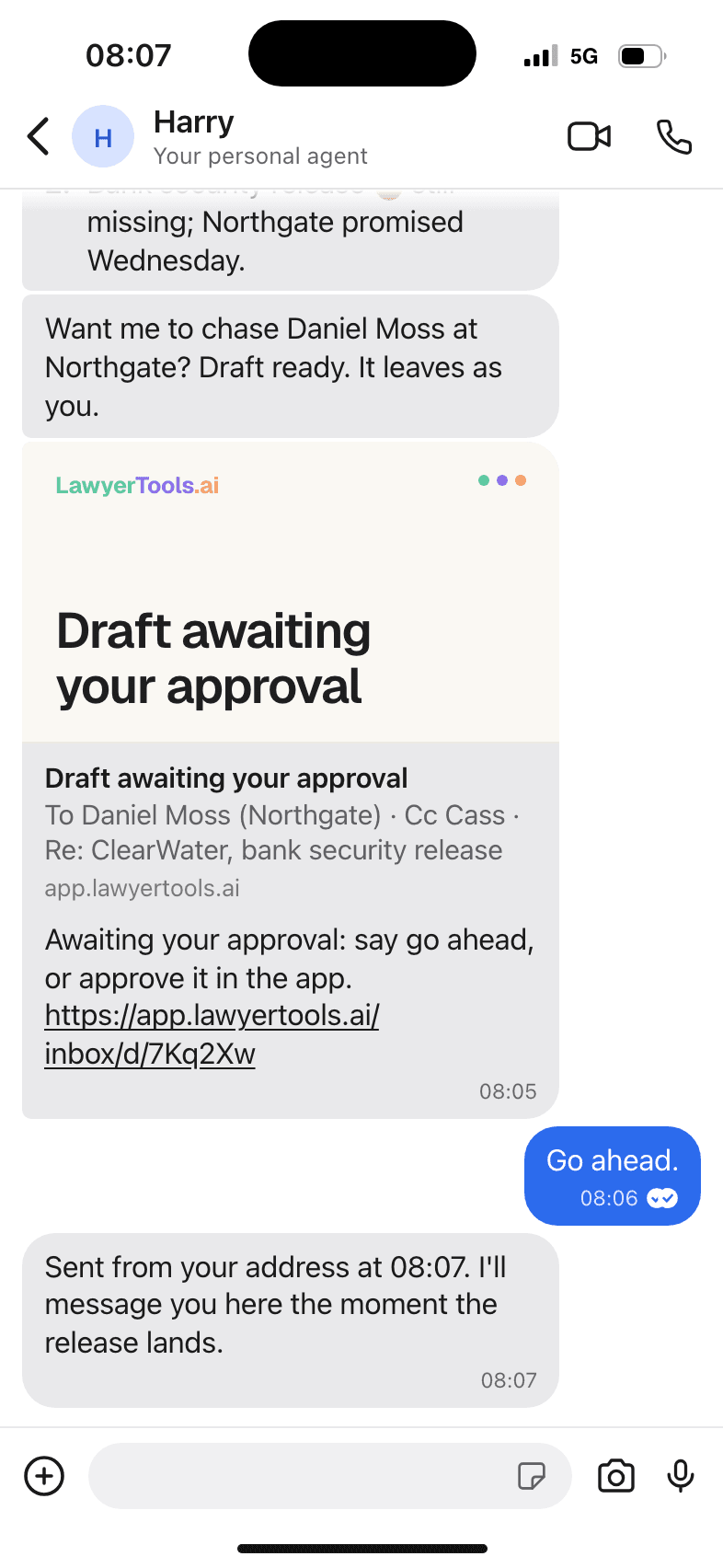
Ask from the back of a cab.
Ask where the CPs stand and the answer comes from the file: what is in, what is missing, who promised what. The chaser is drafted at once; it leaves as you when you say go, on Signal or from your Inbox.
Public beta
It reads your email, drafts in your voice, produces the documents and acts on your standing instructions. The big jobs come to you as a plan to approve.
You’re on the list. We’ll be in touch.
Free until 31 December 2026 · access opened in waves
or book 20 minutes with the founder
By requesting access, you consent to LawyerTools contacting you about the beta. Your email is processed under our Privacy Policy, kept until the beta ends or you ask us to delete it, and never shared.

Backed byIncubateur du Barreau de Paris, Q1 2026Everything stored in FranceThe AI model keeps nothingNever used for trainingBuilt by a former Linklaters M&A lawyer
A day with your agents
Claire Delmas is an M&A partner. Her personal agent, which she named Harry, works in her inbox, her documents and her messages, and asks before anything leaves her hands. Each of her deals has its own agent.
01Signal
Ask where the CPs stand and the answer comes from the file: what is in, what is missing, who promised what. The chaser is drafted at once; it leaves as you when you say go, on Signal or from your Inbox.
02Inbox
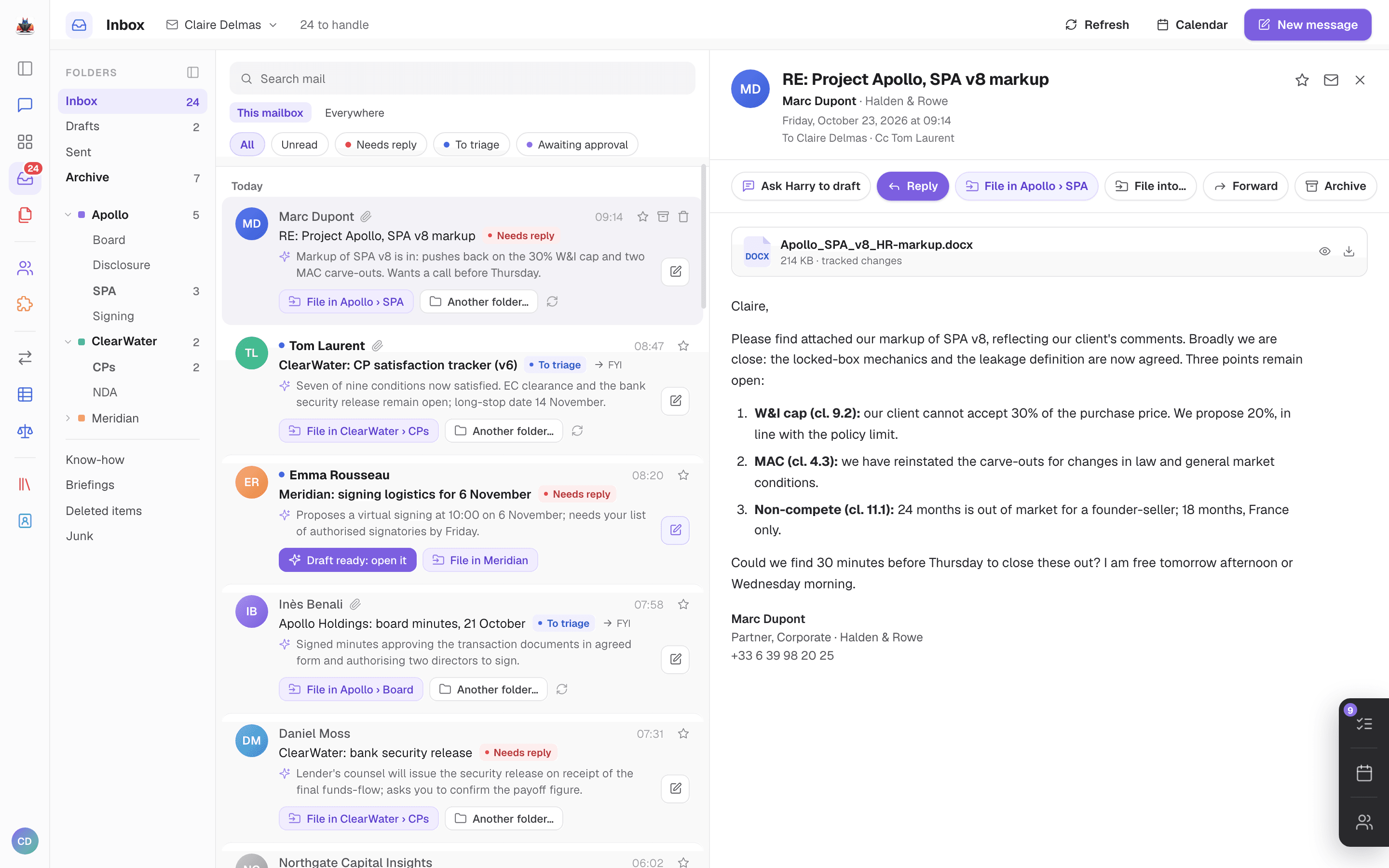
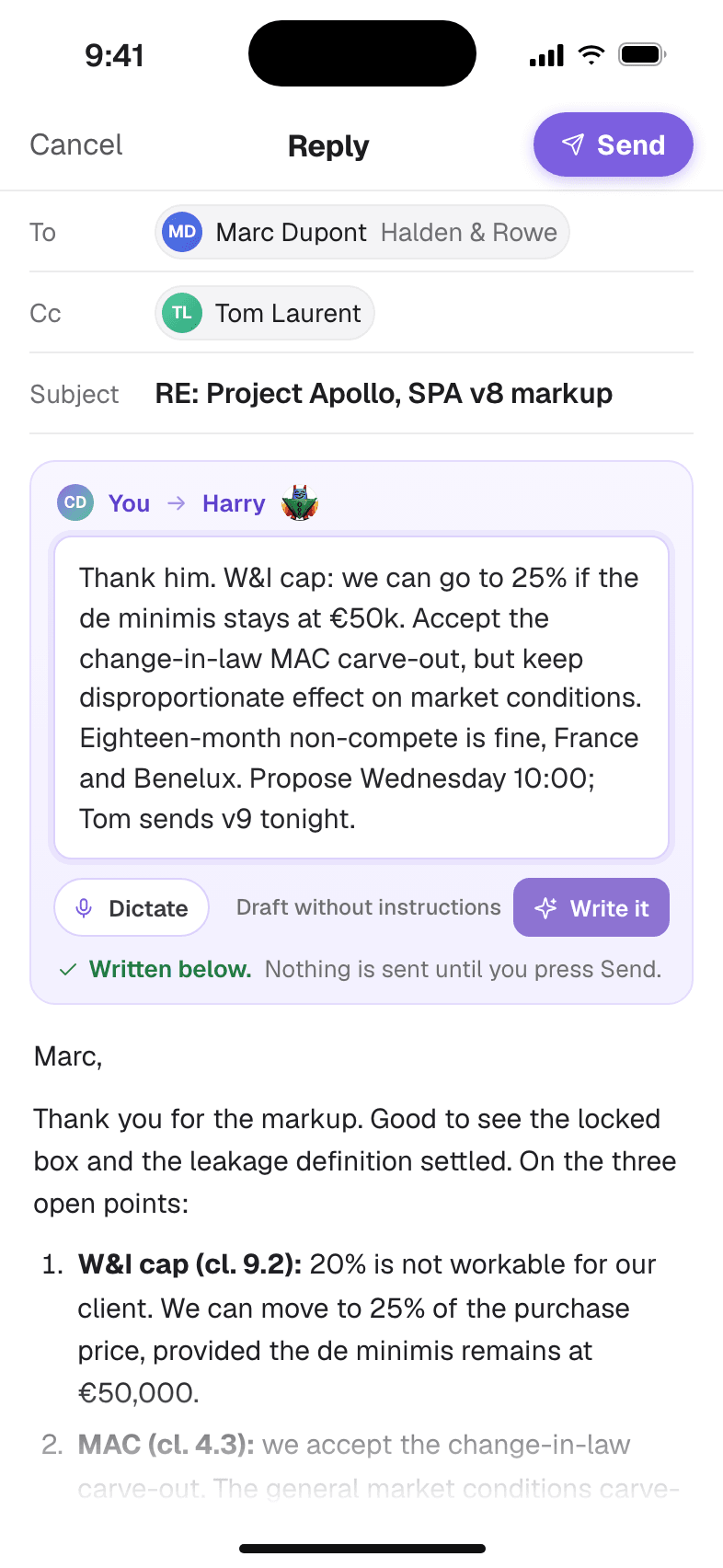
Each message arrives summarised and marked (needs a reply, to triage, for information), with its folder in the matter already suggested. One click files it. One more asks your agent to draft.
03Drafting
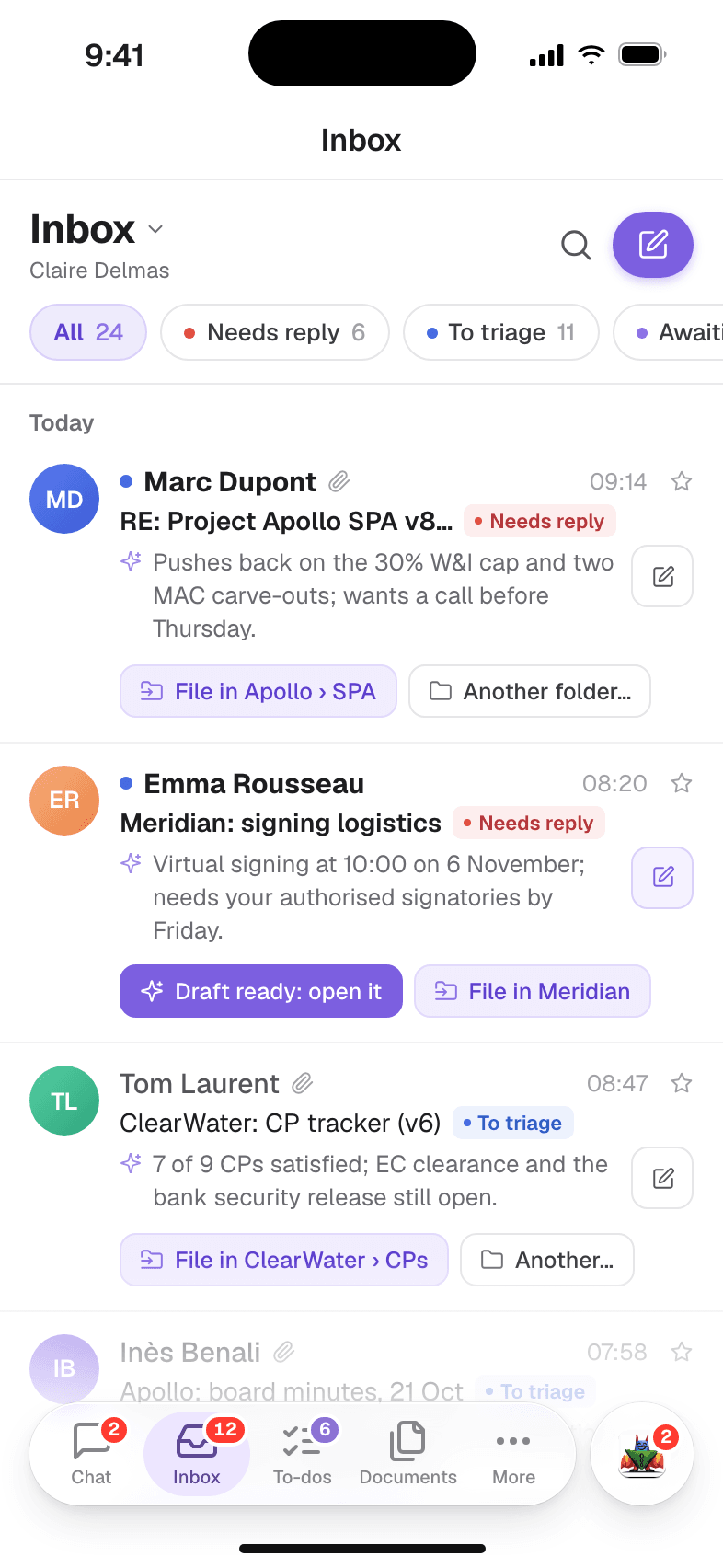
Tell your agent what to say: the cap you can accept, the carve-out you keep, the date for the call. The reply is written in your register, in the same thread. Nothing leaves until you press Send.
04Documents
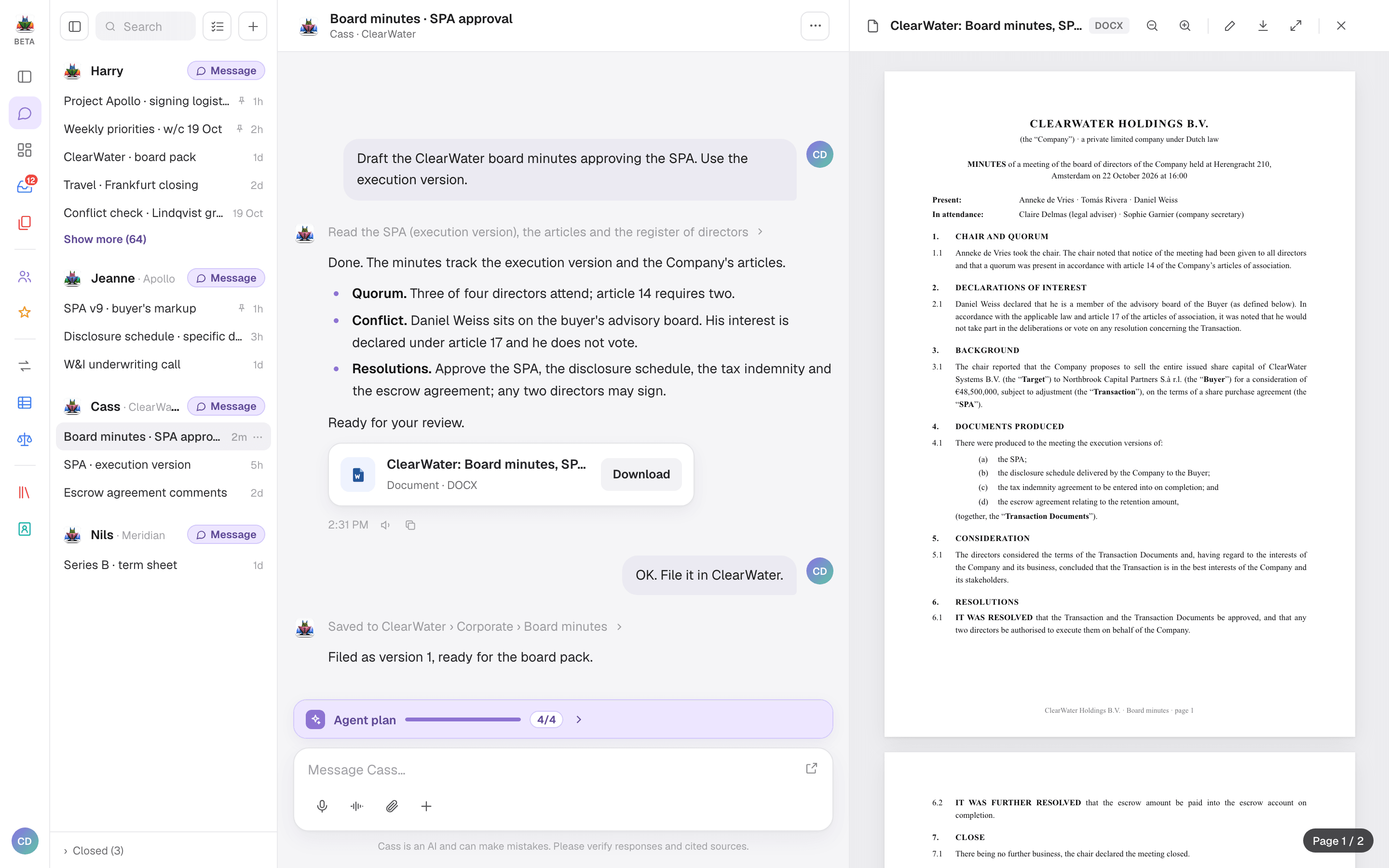
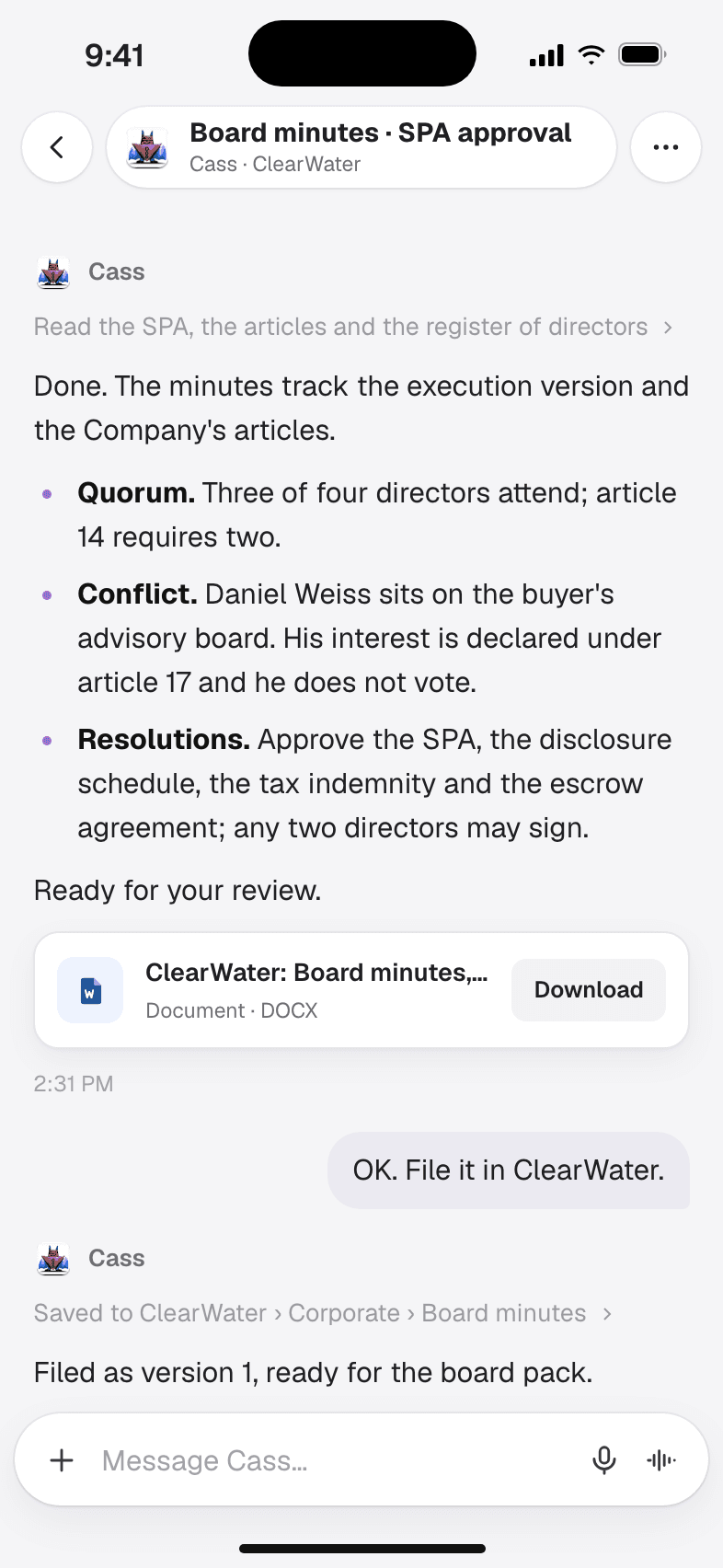
Board minutes from the execution version, quorum and conflicts checked, the two blanks left for you highlighted. A Word document, saved to ClearWater › Corporate › Board minutes.
Control
For a large job, it lays out the steps, the agents and the cost, and starts on your go.
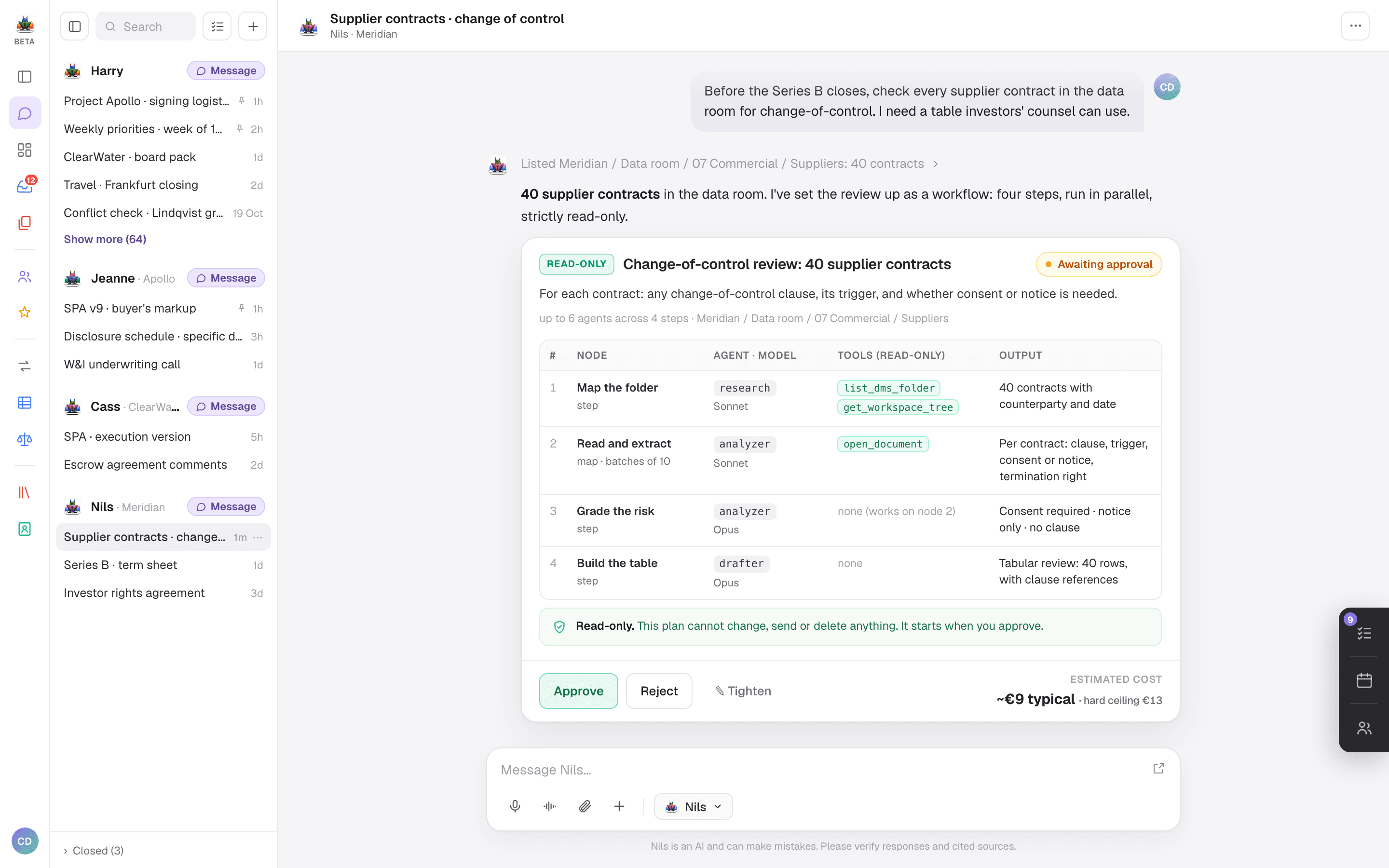
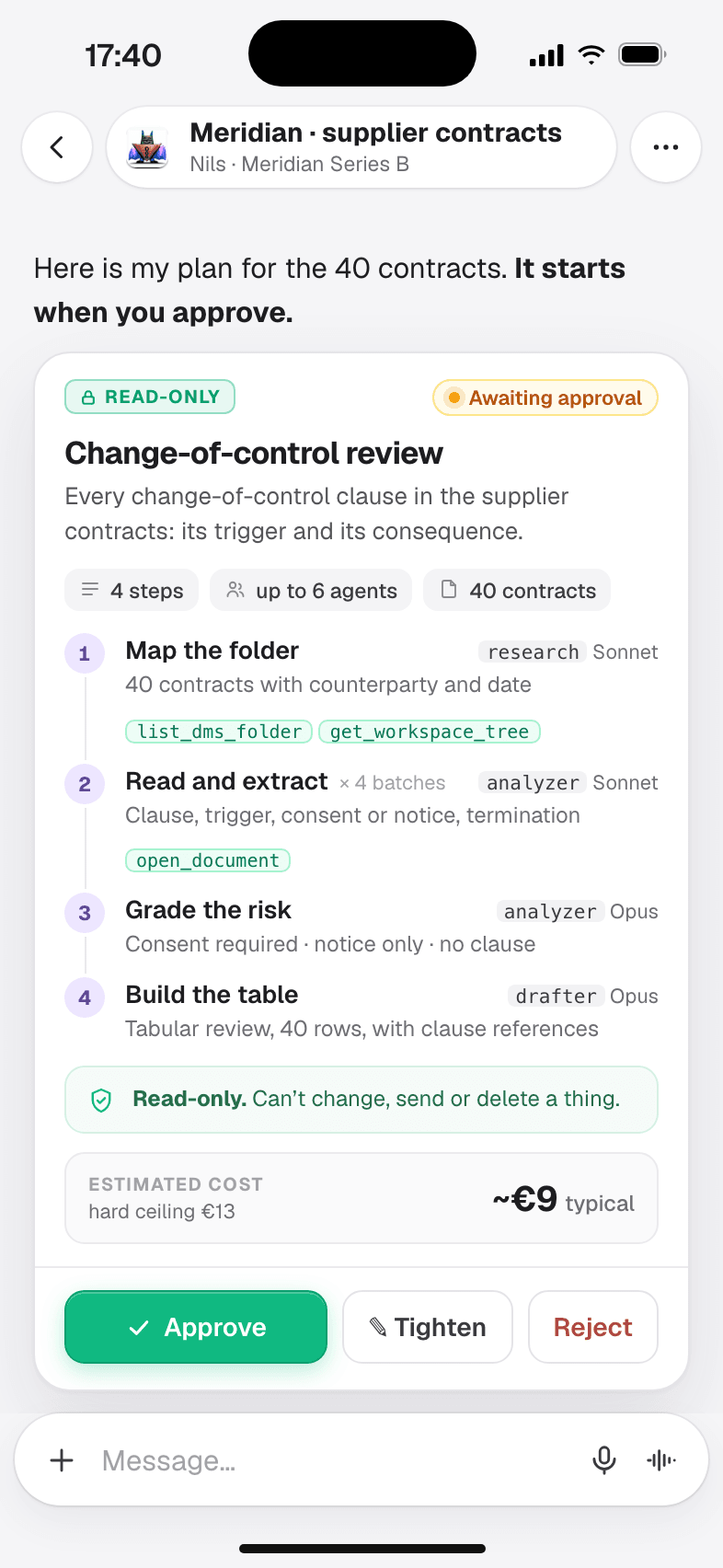
From your desk or from your iPhone. Tighten the plan in a sentence, or turn it down.
Every plan shows its estimated cost and a hard ceiling it cannot exceed.
A read-only plan cannot change, send or delete anything.
Every agent action is logged, with its cost.
Agents
Deal agents: coming soon.
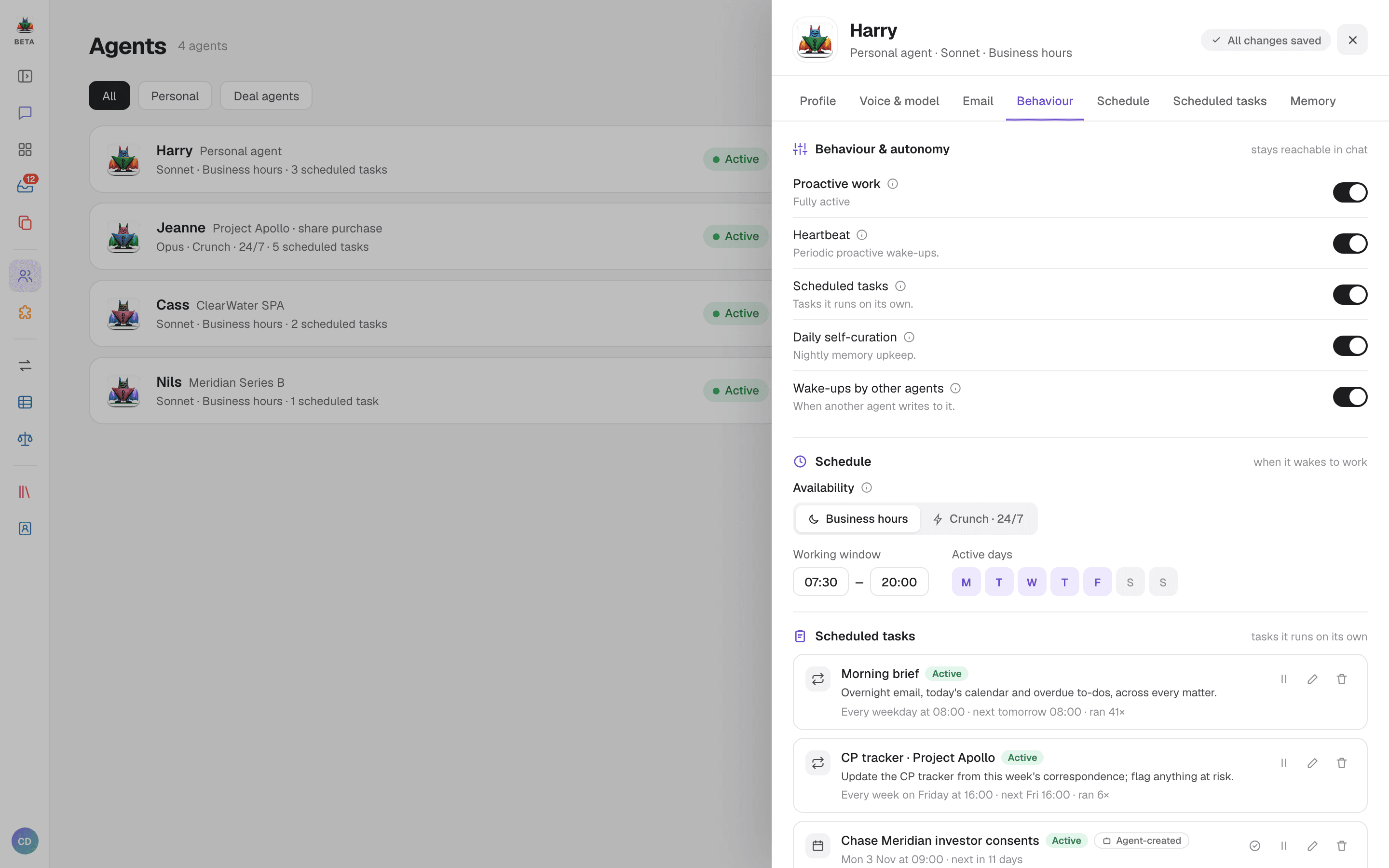
Claire’s personal agent works for her alone. Each deal has its own agent, named by the team: here Jeanne holds Project Apollo, Cass the ClearWater SPA, Nils the Meridian Series B. Each sees only its own deal.
You set their hours, how much they do on their own, and the tasks they run without being asked: a morning brief every weekday at 08:00, the CP tracker every Friday.
Channels
No new habit to learn. Your agents answer where the conversation already is, and the platform keeps the record.
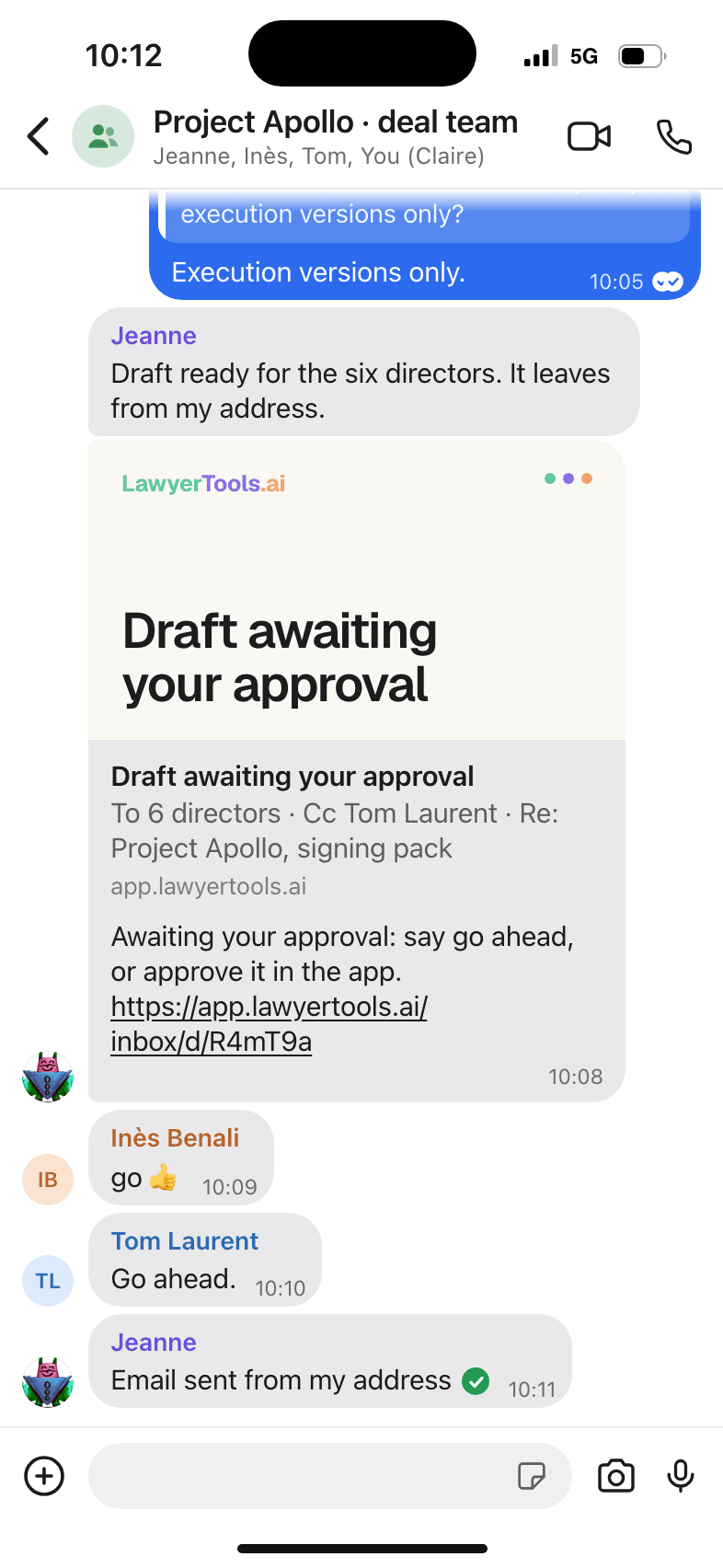
Signal · the deal group
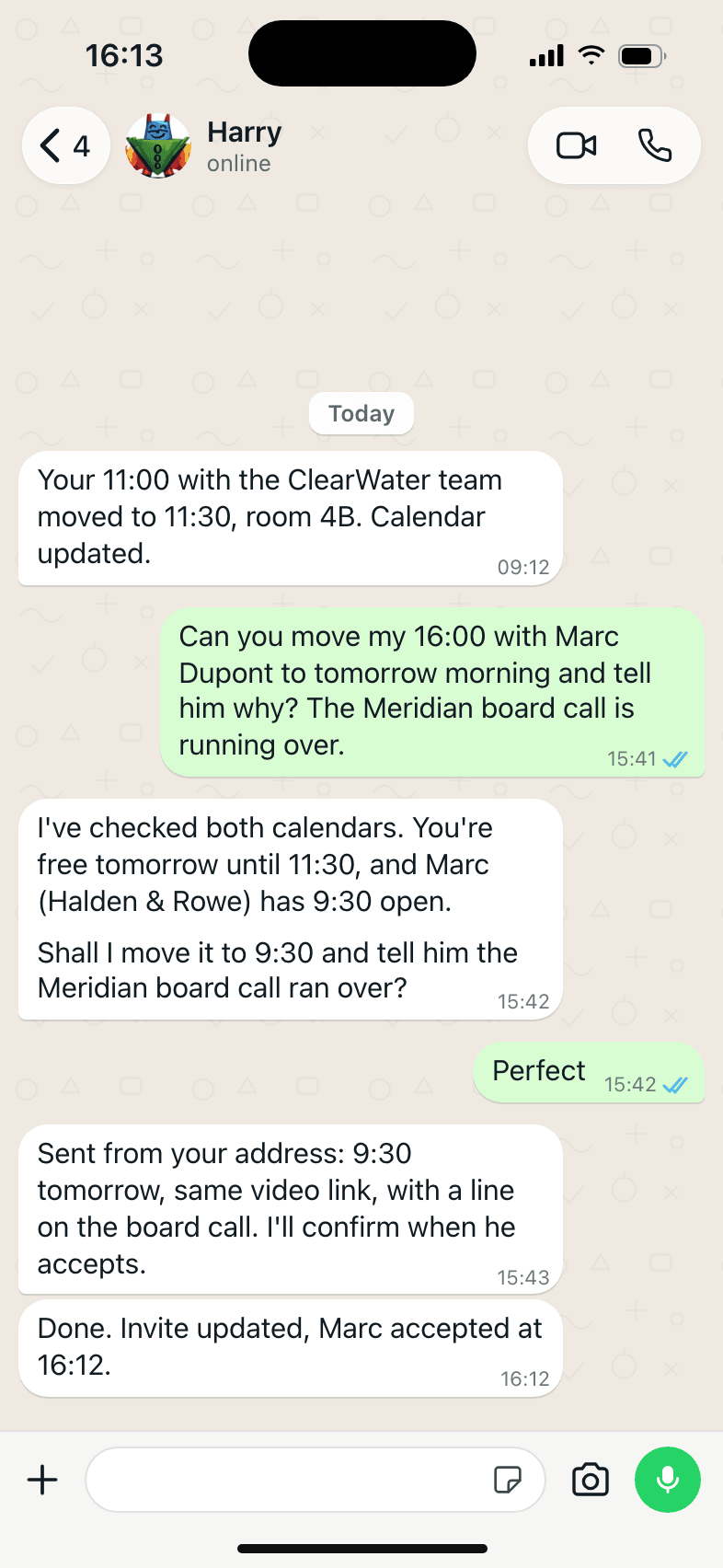
WhatsApp · one to one
Email · on your iPhone
Security
Ask us, and we’ll show you each one.
Every provider and every retention period, on the security pageAuthentication is delegated to an open-source identity server we host (Zitadel): our application never sees or stores a password. Passwords live only in that server, with SSO and multi-factor authentication available.
Your data and documents are stored in Paris.
The models run at Anthropic and OpenAI, used via API. Inference hosted in Europe is in preparation.
Everything your agents learn about your matters is stored on our servers in France. The Anthropic models they reason with keep nothing after each response (zero data retention). OpenAI, used for voice transcription, reading scanned documents and spoken replies, has been asked for the same.
Who it is for
It was designed around the M&A workflow, one of the heaviest there is: email, process and documents, in volume. It serves lawyers, funds, investment banks, in-house legal teams and advisers, and every professional team whose work is collaborative and document-heavy.
It also runs the everyday: booking meetings, to-dos, email, the document library. The beta is open: access is opened in waves, first come, first served.

Who built this
“The law was the part I trained for. It was never the part that filled my days.”
Louis PradesFounder · twelve years M&A at Linklaters, Paris
What filled them was hunting for the precedent that already existed somewhere in the firm. Running the compare again because the version I had wasn’t the version they sent. Working out which of four files was the one to keep. Triaging an inbox at midnight. Rebuilding the same issues list for the third time.
And underneath all of it, the part nobody puts on a timesheet: carrying the weight of never forgetting anything that mattered.
So I learned to build software, to make the tool I had always wanted: an assistant that holds the whole deal in its head, does the coordination and hands the judgment back to me. I used it on my own files before I showed it to anyone.
 I built it to lift that mental load, to simplify how transactional lawyers work, and to get back real time with my children. The default face of every agent was drawn by my son. I kept it.
Public beta
One hundred places.
Pricing on request (see pricing).
You’re on the list. We’ll be in touch.
Access opened in waves, first come, first served
By requesting access, you consent to LawyerTools contacting you about the beta. Your email is processed under our Privacy Policy, kept until the beta ends or you ask us to delete it, and never shared.
Not to anyone new. A letter that leaves as you, to someone you have not authorised, waits for your explicit go: a word on Signal, or a click in your Inbox. Only the people you have authorised to write to your assistant are sent to directly, and you keep that list.
You are, and the product is built so that stays workable. The agent prepares; you decide and sign. Every claim it makes points back to the document, version and clause it came from, so you can check it before you rely on it.
When it can’t establish something, it stops and says so rather than filling the gap.
Structurally. There is one deal agent per deal, and it only ever sees its own deal. There’s no shared pool of matter knowledge an agent could read across, so the separation your conflicts team requires is the architecture, not a setting someone could misconfigure.
The agents run on models from Anthropic and OpenAI. Our model providers, used via API, do not train on your data, and we train no model of our own.
Inference hosted in Europe, and a choice of model for each organisation, are in preparation.
The detail, provider by provider, is on the security page.
Those tools answer when you ask. Our agents also act when you don’t: an agent holds a standing instruction, watches for the trigger, does the work and hands you the result, with the deal’s whole history behind it rather than a fresh context window each time.
And it is built for the transactional workflow specifically: for the big jobs, the agent proposes a workflow and you approve it.